
The Complete Guide to Technology for Aging in Place: What Seniors and Caregivers Need to Know

It was 2:47 a.m. in the morning when my phone rang. My sister’s phone. My heart stopped.
She never calls this time of night. Never. In those three seconds before I answered, my mind raced through every worst-case scenario—falls, stroke, fire, can’t breathe. “Hello? HELLO?!” Silence. Then I heard her voice, groggy and confused: “Oh… I must have hit the phone when I got up to use the bathroom. Sorry, honey. Go back to sleep.” It was nothing. Just an accident. But my hands were still shaking twenty minutes later. That’s what long-distance caregiving does to you. The constant terror that never shuts off, even when everything turns out fine.
I’ve spent over 20 years caring for my adult son with disabilities and watching my 85-year-old sister navigate aging three hours away from me. And here’s what keeps me up at night: the constant worry. Did my son take his medications? Is my sister okay after I hung up the phone with her? What if something happens and no one’s there to help?
For years, I handled these worries the traditional way—phone calls multiple times a day, detailed medication schedules written on paper, emergency contact lists taped to every wall, and constant vigilance. It was exhausting. And honestly? It still is.
I’m not talking about robots taking over caregiving. I’m talking about practical tools that handle the routine stuff so we humans can focus on what really matters: connection, love, and quality of life.
This guide is everything I’ve learned (and am still learning) about using technology to support aging in place. Not from a tech expert perspective—I’m definitely not that. But from someone living this reality every single day, researching solutions desperately, and figuring out what actually works versus what’s just clever marketing.
What Does “Aging in Place” Really Mean?
Aging in place simply means being able to live in your own home safely and independently, no matter your age or ability level.

It’s about waking up in the bedroom where you’ve slept for 30 years. Making coffee in your own kitchen. Sitting in your favorite chair. Being surrounded by your memories, your belongings, your life.
For most seniors, staying home isn’t just a preference—it’s deeply important to their sense of identity and dignity. Studies show that about 90% of adults over 65 want to stay in their own homes as they age. Not move to assisted living. Not move in with adult children. Home.
The traditional approach to aging in place involves physical modifications (grab bars in the bathroom, ramps at entrances, better lighting), established daily routines, and human assistance from family or professional caregivers.
These remain absolutely essential. Technology doesn’t replace them—it enhances them.
What I Mean by “Tech-Enabled Aging in Place”

Tech-enabled aging in place means using helpful technology alongside traditional support methods to make living at home safer, easier, and less isolating.
This might include:
- Voice-activated assistants that let someone with arthritis control lights and thermostats without getting up or struggling with tiny switches
- Automated medication dispensers that eliminate the “did I take my pills?” anxiety
- Medical alert systems that call for help automatically if someone falls
- Activity monitoring that gives distant family members peace of mind without being invasive
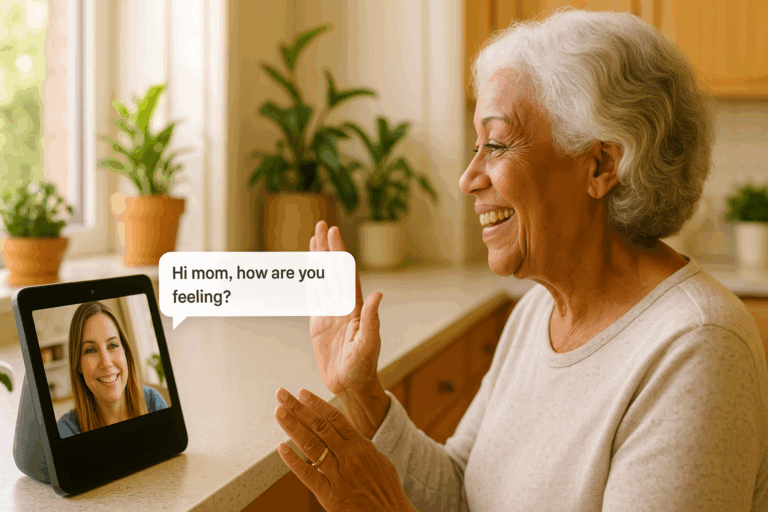
- Video calling devices that keep seniors connected to family without needing to understand complicated apps
Why I’m Writing This Guide (And Why I’m Still Learning)
Think of it this way: technology handles the routine monitoring, reminders, and simple tasks, which frees up human caregivers (whether family or professionals) to focus on meaningful interaction and complex care needs.
Here’s something important you should know upfront: I haven’t implemented all of these technologies yet. I’m in the research phase for many of them, and I’m being very deliberate about which ones I try.
Why am I writing this guide before I’ve personally used everything? Because I needed this information myself, and if I needed it, I’m guessing you do too.
I’ve spent hundreds of hours researching these technologies—reading scientific studies, watching user reviews, calling customer service lines to test their responsiveness, comparing privacy policies, and talking to other caregivers about what actually works in real life.
This guide represents my research roadmap. These are the solutions I’m considering for my son and my sister, organized in a way that makes sense for families facing similar challenges.
As I implement these technologies, I’ll share my real experiences—the wins and the failures—on this website. You can follow my journey and learn from my mistakes so you don’t have to make them yourself.
The Technology Landscape: What’s Actually Available
Let me break down the main categories of technology that support aging in place. I’ve organized them by the problems they solve rather than by technical specifications, because that’s how real life works—you start with a problem, then find a solution.
1. Emergency Response & Fall Detection
The Problem: Falls are the #1 cause of injury for seniors. One in four adults over 65 falls each year. Getting help quickly—within that “golden hour”—makes a huge difference in recovery.
The Technology Solution: Medical alert systems with automatic fall detection. You wear a small device (pendant or wristband), and if you fall, it automatically calls for help even if you can’t press a button.
Modern systems have GPS so they work outside the home too. Some integrate with smart home systems to unlock doors for paramedics. And the best ones have month-to-month contracts so you’re not locked in long-term.
My Research: I’ve narrowed it down to three top systems for my sister based on features, cost, and customer service quality. The decision will come down to which one she’s most likely to actually wear consistently.
→ Read my detailed comparison: [Best Medical Alert Systems for Seniors in 2025: An Honest Comparison]
2. Medication Management
The Problem: Medication errors send 1.3 million people to emergency rooms annually. For seniors taking multiple medications at different times, managing everything correctly is genuinely challenging. Missing doses, taking doses twice, or mixing up medications can have serious consequences.
The Technology Solution: Smart medication dispensers that automatically dispense the right pills at the right time, provide reminders, and alert family members if doses are missed.
These range from simple reminder systems ($30-80) to sophisticated automated dispensers ($100-500 plus monthly subscriptions) that sort, dispense, and track everything.
My Research: For my son’s complex 8-medication schedule, I’m looking at the Hero system or MedMinder Jon. For my sister’s simpler regimen, a mid-range reminder system might be sufficient. Cost, ease of refilling, and reliability of alerts are my main decision factors.
→ Read my detailed comparison: [Smart Medication Dispensers: Which One Actually Works? (2025 Review)]
3. Communication & Connection
The Problem: Social isolation affects 1 in 4 seniors and increases mortality risk by 29%. Phone calls are nice, but being able to see someone’s face matters more than most people realize. Unfortunately, video calling on smartphones or tablets is often too complicated for seniors who aren’t tech-comfortable.
The Technology Solution: Smart displays with screens (Amazon Echo Show, Google Nest Hub Max) that make video calling as simple as talking. No apps to open. No buttons to remember. Just “Alexa, call my daughter” and suddenly you’re face-to-face.
These devices also provide medication reminders, control smart home features, play music, show family photos, and even allow family to “drop in” for visual check-ins without the senior needing to answer.
My Research: I’m getting an Echo Show 8 for my sister specifically for video calling. The “Drop In” feature means I can visually check on her without making it feel like surveillance, and she won’t have to remember how to answer.
→ Read my detailed comparison: [Amazon Echo Show vs Google Nest Hub: Which is Better for Seniors?]
4. Home Monitoring (Privacy-Respectful)
The Problem: Family members worry when they can’t physically be there. Is Mom eating? Did Dad get out of bed this morning? Is she wandering at night? But seniors understandably resist feeling monitored or surveilled.
The Technology Solution: Motion sensor systems and activity monitoring that provide safety oversight without cameras. These systems use sensors to detect patterns—not watch specific actions.
For example, motion sensors in different rooms can show that someone got up, went to the kitchen (probably made breakfast), moved to the living room. If there’s no movement by a certain time when there usually is, family gets an alert to check in.
The key difference from cameras: these systems show patterns and routines, not images. Your privacy stays intact.
My Research: I’m exploring systems like CarePredict, SNUGG, and budget DIY options like Wyze sensors. The challenge is finding the sweet spot between enough information to provide peace of mind and not so much monitoring that it feels invasive.
→ Read my detailed guide: [Privacy-Safe Home Monitoring for Seniors: No Cameras Required] (coming soon)
5. Health Monitoring
The Problem: Catching health problems early makes a huge difference in outcomes. But remembering to check blood pressure, track blood sugar, or monitor weight consistently is hard. And getting that information to doctors is even harder.
The Technology Solution: Connected health devices that automatically track vital signs and share data with family members or healthcare providers. Blood pressure monitors, glucose monitors, smart scales, pulse oximeters, and thermometers that sync with apps.
Many of these devices are now covered by Medicare or insurance when prescribed by a doctor, especially for chronic condition management.
My Research: I’m looking at the Withings BPM Connect for blood pressure monitoring and potentially a continuous glucose monitor if my sister’s doctor recommends it. The key factors are ease of use, automatic syncing (so she doesn’t have to do anything technical), and whether insurance will cover it.
→ Read my detailed guide: [Best Health Monitoring Devices for Seniors: Blood Pressure, Glucose & More] (coming soon)
6. Smart Home Control
The Problem: Physical limitations—arthritis, vision problems, mobility issues—make simple household tasks harder. Getting up to turn off lights. Walking to the thermostat. Unlocking doors. These small actions become big challenges.
The Technology Solution: Voice-controlled smart home devices. Smart lights you can control by voice. Smart thermostats that adjust automatically or respond to “Alexa, set the temperature to 72.” Smart locks that family members can unlock remotely if there’s an emergency.
The beauty of voice control is that it eliminates the need for small buttons, switches, apps, or physical movement.
My Research: I’m starting with smart lights and smart plugs as the easiest entry point. Once someone gets comfortable with voice control for lighting, adding other smart home features becomes less intimidating.
The Real Benefits (And the Honest Limitations)
Let me be straight with you about what these technologies can and cannot do.
What Technology CAN Do:
For Seniors:
- Provide reliable reminders without human nagging
- Enable independence by reducing reliance on others for routine tasks
- Offer peace of mind through emergency response capability
- Maintain connection with distant family members
- Support aging in place longer by addressing safety concerns
- Allow control over environment despite physical limitations
For Caregivers:
- Reduce constant worry through activity monitoring
- Eliminate multiple daily “did you take your pills?” phone calls
- Provide early warning of potential problems
- Enable visual check-ins without invasive surveillance
- Allow you to be more present during actual visits instead of handling routine tasks
- Make long-distance caregiving more feasible
What Technology CANNOT Do:
- Replace human connection, empathy, and presence
- Provide hands-on physical care (bathing, dressing, meal preparation)
- Make complex medical decisions
- Understand emotional needs and subtle changes in wellbeing
- Respond to truly unique or unprecedented situations
- Provide the comfort of a hug or holding someone’s hand
Technology is a tool. A really helpful tool. But it’s not a substitute for human care and love.
Important Considerations Before Adopting Any Technology
Through my research and my years of caregiving experience, I’ve identified several critical factors to consider before bringing technology into an aging-in-place situation.
1. The Learning Curve
Most systems don’t require extensive technical knowledge, but they do require some adjustment. Seniors who have never used voice assistants will need patience and practice. Family members will need to provide setup support and ongoing troubleshooting.
Be realistic about the senior’s ability and willingness to learn something new. And be honest about your availability to provide help when things don’t work as expected (because sometimes they won’t).
2. Cost—Both Immediate and Ongoing
Technology costs add up:
- Initial device purchase ($50-500 typically)
- Potential monthly subscriptions ($20-70/month for monitoring services)
- Internet/WiFi requirements (if not already in place)
- Battery replacements or equipment upgrades over time
I recommend calculating total first-year costs including all subscriptions before committing. And remember: month-to-month contracts are almost always better than long-term commitments until you know the system works for your situation.
3. Privacy and Security
Many devices are always connected to the internet and company servers. This raises legitimate questions:
- What data is being collected?
- Who has access to that data?
- How secure are these systems from hacking?
- Can the company see into your home through cameras or hear conversations?
Look for companies with clear privacy policies, good security track records, and features like physical camera shutters for when you want guaranteed privacy.
4. Physical Limitations Matter
Marketing materials show healthy people using products easily. Reality is often different.
Consider specific limitations:
- Can they hear notification sounds? (hearing impairment)
- Can they speak clearly enough for voice recognition? (speech difficulties)
- Can they see screens or indicator lights? (vision challenges)
- Can they physically reach or manipulate devices? (mobility/dexterity issues)
The most feature-rich system is worthless if it doesn’t work with someone’s actual abilities.
5. Resistance and Acceptance
Many seniors resist technology that makes them feel “old,” “sick,” or “monitored.” This resistance is valid and deserves respect.
Success usually comes from:
- Focusing on benefits (more independence, less worry) rather than deficits
- Starting with one simple, clearly helpful technology rather than comprehensive systems
- Framing it as helping the caregiver worry less (people are often more willing to help others than accept help themselves)
- Involving the senior in the decision-making process
- Offering trial periods with easy returns if it doesn’t work out
Getting Started: A Practical Approach
Based on everything I’ve learned, here’s the approach I recommend (and the one I’m following myself):
Step 1: Identify Your Single Biggest Challenge
Don’t try to solve everything at once. What’s the one thing that causes the most worry, takes the most time, or creates the most stress?
Is it:
- Falls when alone?
- Medication management?
- Social isolation?
- Not knowing if they’re okay day-to-day?
- Getting help in emergencies?
Your answer to this question should drive your first technology choice.
Step 2: Research Specific Solutions
Once you know your priority, research 2-3 options that specifically address that problem:
- Read detailed reviews from actual users (not just marketing materials)
- Check customer service quality by calling with pre-purchase questions
- Verify return policies and trial periods (30+ days is ideal)
- Compare total costs including subscriptions
- Check compatibility with existing devices/systems
I’ve done this research and written detailed guides for the major categories—use those to jump-start your process.
Step 3: Start Small
Buy one device. Set it up. Use it for 30 days consistently. Then evaluate honestly:
- Is it actually helping?
- Is it being used regularly without resistance?
- Does the benefit justify the cost and hassle?
Only after proving success with one technology should you consider adding another.
Step 4: Build Gradually
As comfort and confidence grow, add complementary technologies:
- Start with medical alert system
- Add medication management after 2-3 months
- Then consider video calling device
- Eventually add home monitoring if needed
This gradual approach prevents overwhelm and allows time to master each system before adding complexity.
The Role of Traditional Caregiving
Here’s something I want to be crystal clear about: technology doesn’t replace caregiving. It enhances it.
The traditional caregiving toolkit—physical modifications, established routines, human assistance, regular check-ins—remains the foundation. Technology simply adds another layer of support.
Think of it like this: grab bars in the bathroom are essential for fall prevention. A medical alert system doesn’t replace grab bars—it adds a safety net for when falls happen anyway despite grab bars.
The most successful aging-in-place situations combine:
- Physical home modifications (grab bars, ramps, better lighting, non-slip surfaces)
- Daily routines and structure (consistent meal times, medication schedules, activity patterns)
- Human interaction and oversight (family visits, professional caregivers, social connections)
- Technology support (monitoring, reminders, communication, emergency response)
Each element supports the others. Remove any one element and the whole structure becomes less stable.
What I’m Doing Next (My Personal Implementation Plan)
Since I’m being completely transparent with you about where I am in this journey, here’s my actual plan:
For my sister (85 years old, living alone in Delaware, 3 hours away):
Phase 1 (Next 2 months):
- Medical alert system with fall detection and GPS (leaning toward Medical Guardian)
- Amazon Echo Show 8 for video calling and medication reminders
- Test period to ensure she’ll actually use both consistently
Phase 2 (Months 3-6):
- If Phase 1 successful, add smart lights for fall prevention at night
- Consider mid-range medication dispenser if she’s having trouble with current system
- Evaluate whether activity monitoring would provide value without feeling invasive
For my son (adult with disabilities, living with me):
Phase 1 (Next 2 months):
- Hero medication management system for his complex 8-medication schedule
- This is my highest priority and biggest pain point
Phase 2 (Months 3-6):
- Voice-controlled smart home features to increase his independence
- Possibly smart locks so he can let caregivers in without me being home
I’m sharing this specific timeline because I want you to see that even someone who has researched this extensively isn’t implementing everything at once. Slow and deliberate wins over fast and overwhelming.
Resources and Next Steps
Download My Free Comprehensive Guide
Everything in this article is just the overview. I’ve created a detailed guide called “Technology That Actually Helps: The Complete 2025 Guide for Aging in Place” that goes deep into:
- Specific product recommendations with exact models and prices
- Setup instructions for non-tech-savvy users
- Comparison charts
- Decision frameworks
- Common mistakes to avoid
- Real cost analysis
[Download the free guide here]
Read My Detailed Product Reviews
I’ve written comprehensive, honest reviews of specific products in each category:
- [Best Medical Alert Systems for Seniors in 2025] – Detailed comparison of Medical Guardian, Bay Alarm, GetSafe, Life Alert, and MobileHelp
- [Smart Medication Dispensers: Which One Actually Works?] – Hero, MedMinder, Pria, MedGlider, and budget options compared
- [Amazon Echo Show vs Google Nest Hub: Which is Better for Seniors?] – Every model explained with honest pros and cons
- [Privacy-Safe Home Monitoring for Seniors] (coming soon) – CarePredict, SNUGG, Wyze, Ring, and radar technology options
- [Best Health Monitoring Devices for Seniors] (coming soon) – Blood pressure monitors, glucose monitors, smart scales, and more
Follow My Implementation Journey
I’ll be documenting my real experiences as I implement these technologies:
- What worked and what didn’t
- Setup challenges and solutions
- How my son and sister actually responded
- Unexpected benefits and disappointing failures
- Cost reality versus advertised prices
Subscribe to my newsletter to get updates as I share this journey: [Subscribe here]
Final Thoughts: Permission to Start Imperfectly
If there’s one thing I want you to take away from this guide, it’s this: you don’t have to have it all figured out before you start.
I don’t have it all figured out. I’m figuring it out as I go, just like you.
The perfect technology solution doesn’t exist. There will be hiccups. There will be devices that don’t work as advertised. There will be resistance from the person you’re trying to help. There will be frustrating customer service calls and confusing setup processes.
That’s all normal. That’s all okay.
What matters is taking one small step. Choosing one technology that addresses one real problem. Trying it. Learning from it. Adjusting. And gradually building a system that works for your specific situation.
The goal isn’t to implement every technology mentioned in this guide. The goal is to find the few tools that genuinely make life better, safer, and less stressful for both the senior and the caregiver.
Technology is advancing rapidly. What’s complicated today will be simpler tomorrow. What’s expensive today will be cheaper next year. You don’t have to wait for the perfect moment—start where you are with what’s available now.
And remember: aging in place with dignity isn’t about achieving independence through technology alone. It’s about supporting independence through a combination of tools, modifications, routines, human care, and love.
The technology is just one piece. An important piece, but just one piece.
You’ve got this. And you’re not alone in figuring it out.